
Turn MQTT topics into tables
Your broker delivers messages. Message History keeps them. Pick a topic, map its fields, and query the history in EMQX Tables. No pipeline to build.
Illustration: each MQTT message published to sensors/+/telemetry becomes a new row in the table sensor_history. The value device_id is stored as a Tag, temperature and humidity as Fields.
SELECT device_id, avg(temperature) AS avg_temperature
FROM public."sensor_history"
WHERE "timestamp" >= now() - '1 hour'::INTERVAL
GROUP BY device_id;
A broker is built to deliver, not to remember
Once a message reaches its subscribers, the broker is done with it. To look back at what a device sent, you need storage, and something to fill it.
What is Message History?
Message History is a feature of EMQX Cloud that stores the messages of selected MQTT topics in EMQX Tables, a managed time-series database. You pick the topic and the fields to keep in a three-step wizard, then query the stored messages with SQL.
- Works with
- EMQX Cloud Dedicated Flex, on EMQX 6.1.4 or later
- Stores messages in
- EMQX Tables, in the same network as the broker
- Kept for
- 30 days by default; you set the period
- Query with
- SQL or PromQL, and chart in Grafana
- Setup
- A three-step wizard, no code
- Cost
- No separate charge; EMQX Tables from $0.39 per hour
From topic to table in three steps
The wizard lives in your broker deployment, under Message History. It creates the connector, the rule and the action for you.
-
STEP 01
Choose where to store
Select an EMQX Tables deployment in the same network, or create one from the wizard. Messages are kept for 30 days unless you change it.
-
STEP 02
Map the message
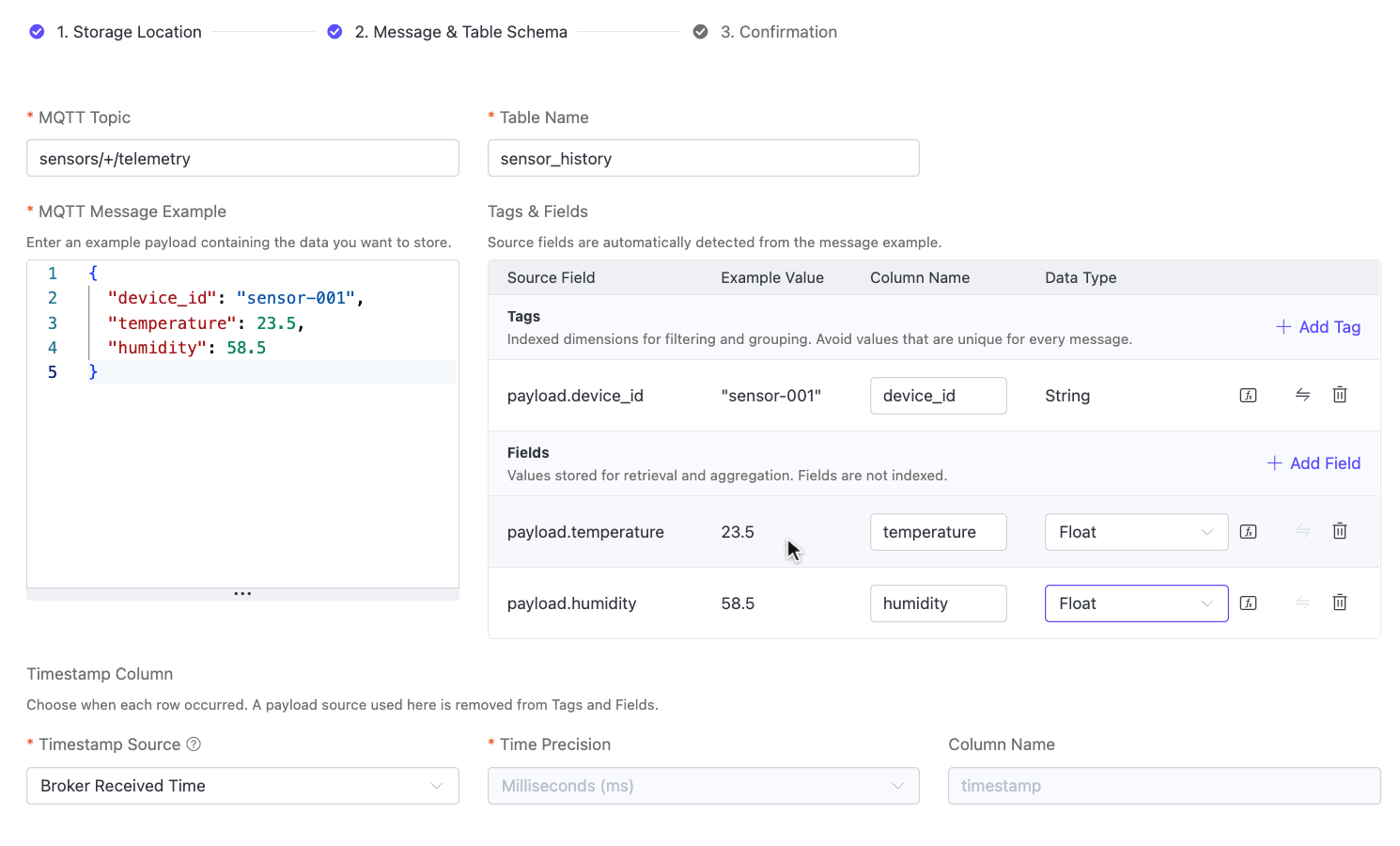
Enter a topic filter and a table name, then paste an example message. Choose which values become Tags, Fields and the timestamp.
-
STEP 03
Confirm
The console tests the mapping against your example. From then on, every matching message is stored as a row.
Paste a message. Get a table.
The console reads your example and suggests the columns. You decide what each value is for.
- Tags for the values you filter and group by, such as a device ID.
- Fields for the measurements, with the data type you choose.
- Timestamp from the broker, or from the device's own clock.
See the rows arrive
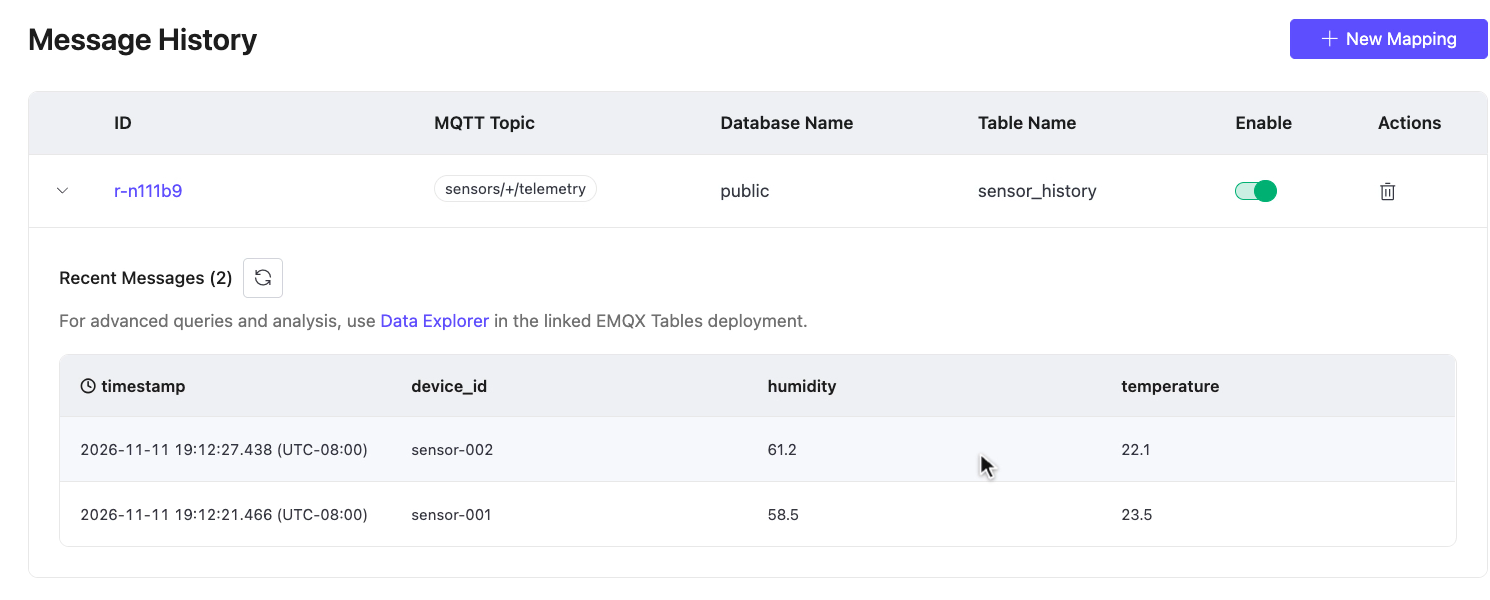
You do not have to leave the broker console to know it works.
- Expand a mapping to preview its most recent rows.
- Open it for delivery metrics: success, failed, dropped.
- Go to Data Explorer in EMQX Tables for full SQL.
Watch it end to end
Two short videos. Set it up in four minutes, then design the table and query it.
What you get with a mapping
Everything needed to go from a stream of messages to a table you can trust.
Guided setup
No Rule SQL to write. The wizard builds the integration and tests it before anything is stored.
Your schema, your choice
Store only the values you pick. Convert types in the wizard when a value needs it.
Preview and metrics
Recent rows and delivery counts for every mapping, next to your broker's other settings.
SQL, PromQL and Grafana
Filter, aggregate and chart in EMQX Tables with the query language and tools you already use.
Retention you control
Rows expire after the period you set. Pause or delete a mapping and the stored data stays.
One network
Broker and database run side by side in EMQX Cloud. Nothing is exposed to move the data.
Put your history to work
The questions that are hard to answer when messages are gone the moment they are delivered.
Troubleshoot devices
What did this device send at 3 a.m.?
Look back at the readings before and after an incident.
Track trends
Is this getting worse?
Compare devices, sites and weeks in SQL or on a dashboard.
Feed analytics and AI
Where is the data for the model?
Give analytics jobs and AI agents a table to query.
Build product features
Can users see their own history?
Put historical charts and usage reports in your application.
Message History is included. Storage is EMQX Tables.
There is no separate charge for Message History. You pay for the EMQX Tables deployment that holds the data.
- Free trial Limited offer1 month, not 14 days
- EMQX Tables Starterfrom $0.39 / hour
- Storage included100 GB and up
- Messages written from EMQX Brokerno per-message fee
- Traffic between broker and Tables, same regionfree
- High availability across zonesPro plan
Frequently asked questions
Does an MQTT broker store messages?
Not as a history. An MQTT broker delivers each message to the clients subscribed at that moment. It keeps only the last retained message of a topic, and the messages queued for offline clients that have a persistent session. To look back at what was published, the messages have to be written to a database. Message History does that for the topics you choose.
How do I store MQTT messages in a database?
In EMQX Cloud, open Message History in your broker deployment, choose the EMQX Tables deployment to store in, enter a topic filter and a table name, map the values of an example message to Tags and Fields, and confirm. From then on, each matching message is stored as a row that you can query with SQL. Without it, you would run a subscriber service that writes to a database of your own.
Is Message History the same as message replay?
No. Message History stores messages in a table for you to query. It does not deliver stored messages to subscribers again.
Does it store messages published before I set it up?
No. It stores the messages received while a mapping is enabled. Earlier messages are not backfilled.
Which deployments support it?
Dedicated Flex deployments running EMQX 6.1.4 or later, with an EMQX Tables deployment in the same network. If you do not have one, you can create it from the wizard.
What does it cost?
Message History has no separate charge. The storage is an EMQX Tables deployment, billed hourly. The standard trial is 14 days on the Starter plan; for a limited time you can ask for one month. See EMQX Tables pricing.
How do I get the one-month free trial?
Fill in the form on this page and tell us what you are working on. We reply within one business day and set up a one-month EMQX Tables trial for you.
How long are messages kept?
30 days by default. You set the retention period when the table is created.
What happens to my data if I disable or delete a mapping?
New messages stop being written. The rows already stored stay in the table until they reach the end of their retention period.
What if my message format changes?
A new field is stored only after you add it to the mapping. If the structure changes in an incompatible way, create a new mapping and table.
Does it use my broker's capacity?
Matching messages count toward the deployment's data integration TPS. Check the headroom on the Metrics page before you map a high-volume topic.
How is it different from Data Integration?
It is built on the same connector, rule and action model, set up for you. Use Data Integration when you need custom Rule SQL, several actions, or a destination other than EMQX Tables.
Try Message History free for a month
A history gets more useful as it builds up, and two weeks is rarely enough to see a trend. Tell us what you are working on and we will set up a one-month trial of EMQX Tables, instead of the standard 14 days.
- One month of EMQX Tables on the Starter plan, at no charge.
- For new and existing EMQX Cloud customers.
- A reply from our team within one business day.
One trial per organization. We confirm the details by email.
Claim your free month
It takes about a minute.
Already running Dedicated Flex? You can start today: open your deployment and choose Message History in the left menu.